Dagdag Kita
LIFETIME: Dagdag Kita Automation Pro
LIFETIME: Dagdag Kita Automation Pro
Couldn't load pickup availability
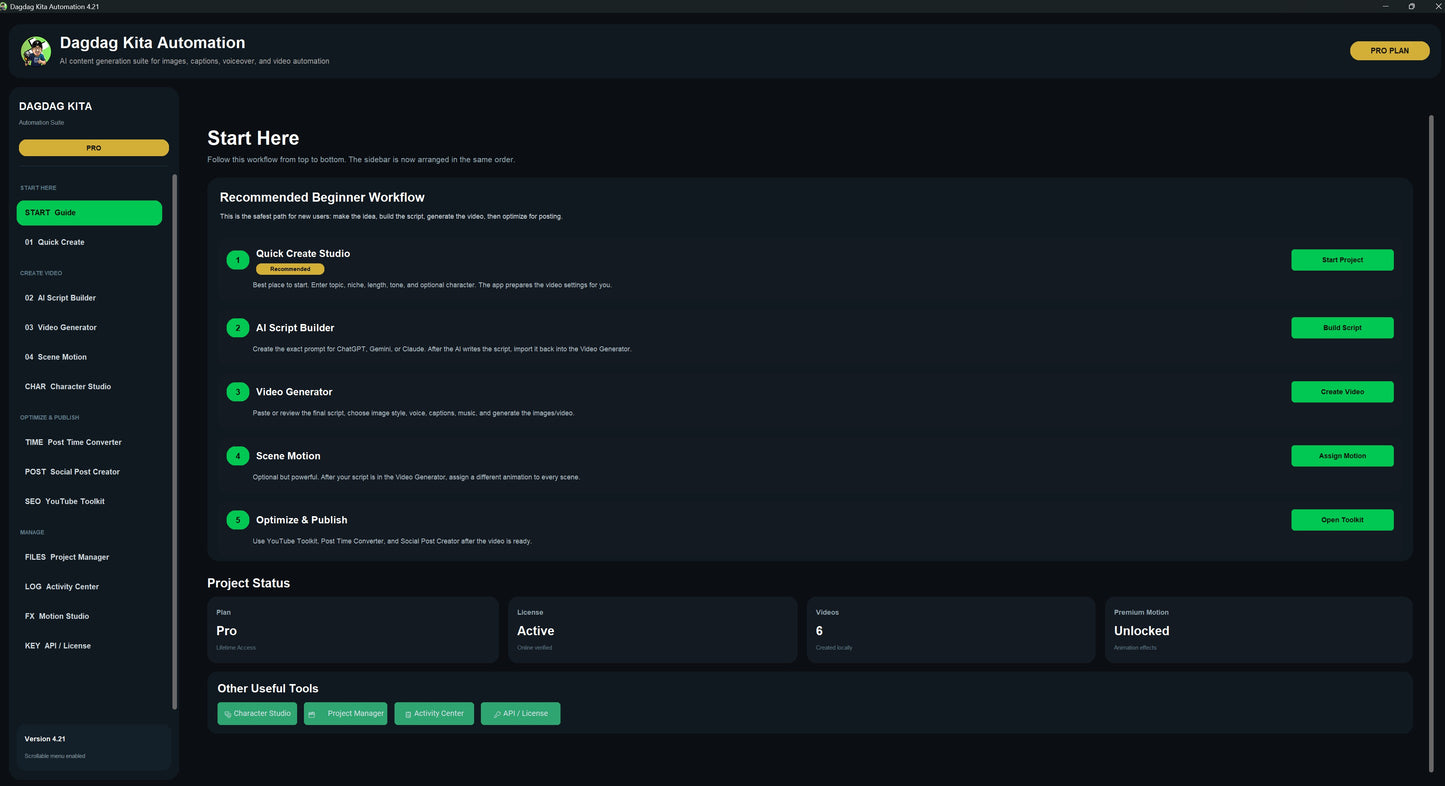
Dagdag Kita Automation
All-in-One AI Content Automation Suite for Creators
Create videos, scripts, captions, voiceovers, social posts, and YouTube publishing assets in one powerful desktop software.
Dagdag Kita Automation is built for content creators, faceless YouTube channels, social media page owners, digital marketers, freelancers, and online business owners who want to create content faster without jumping between multiple tools.
Whether you make YouTube videos, Shorts, Reels, TikTok content, motivational posts, Bible content, educational videos, horror stories, facts videos, or social media graphics, Dagdag Kita Automation gives you a guided workflow from idea to finished content.
What Can Dagdag Kita Automation Do?
Dagdag Kita Automation helps you turn simple ideas or scripts into complete content assets.
You can build scripts, generate images, create voiceovers, add subtitles, apply motion effects, create videos, design social quote posts, prepare YouTube titles and descriptions, and save your projects for later.
It is designed to be beginner-friendly while still giving advanced users more control.
Main Features
Video Generator
Turn your script into a complete video workflow.
Generate scene images, create MP4 videos, add captions, include voiceover, add background music, and export your finished content.
Perfect for:
- Faceless YouTube videos
- Shorts and Reels
- Educational videos
- Story videos
- Bible trivia videos
- Horror stories
- Motivational content
- Facts and history channels
AI Script Builder
Need help writing your script?
Use the built-in AI Script Builder to create structured prompts for ChatGPT, Gemini, Claude, or other AI writing tools.
Choose your topic, tone, target length, hook style, and scene count, then generate a ready-to-use script prompt.
Quick Create Studio
Start faster with a guided beginner workflow.
Quick Create Studio helps you set up your video style, content type, scene count, and creative direction without needing to understand every advanced setting.
Character Studio
Create and save character profiles for more consistent storytelling.
Useful for story channels, cartoon-style content, recurring characters, brand mascots, educational characters, and content series.
Scene Motion
Assign motion effects per scene.
Instead of using the same movement for the whole video, you can customize each scene with zooms, pans, cinematic motion, or premium-style motion effects depending on the plan.
Social Media Post Creator
Create quote graphics and promotional social media posts.
The AI can generate clean backgrounds, while the app adds the text locally so your words stay sharp and readable.
Great for:
- Facebook posts
- Instagram quotes
- Pinterest pins
- Bible verse graphics
- Motivational content
- Business quote posts
- Reels and story backgrounds
YouTube Toolkit
Prepare your video for publishing.
Generate YouTube titles, descriptions, hashtags, SEO keywords, thumbnail prompts, pinned comments, and Shorts/Reels captions.
This helps creators package their content faster and publish more professionally.
Post Time Converter
Plan your posting schedule more easily.
Useful for creators targeting viewers in different countries and time zones.
Project Manager
Save your work as a Dagdag Kita Automation project file.
Projects can be saved and loaded later, so you can continue editing your script, settings, style, motion, and content assets.
Why Use Dagdag Kita Automation?
Most creators use many different tools just to finish one piece of content.
One tool for scripts. Another tool for images. Another tool for voice. Another tool for captions. Another tool for video. Another tool for social posts. Another tool for YouTube titles and descriptions.
Dagdag Kita Automation brings the workflow together into one desktop software.
Built for Beginner Creators
You do not need to be a professional editor.
The software is designed to guide you step by step:
- Start with your idea.
- Build or paste your script.
- Generate your visuals.
- Add voiceover and captions.
- Apply motion.
- Export your video.
- Create your social post.
- Prepare your YouTube publishing kit.
Perfect For
- YouTube creators
- Faceless video creators
- TikTok and Reels creators
- Facebook page owners
- Bible content creators
- Motivational quote pages
- Educational channels
- Horror and story channels
- Freelancers
- Digital marketers
- Small business owners
- AI content creators
- Content agencies
Available Plans
Basic — 6 Months
Best for beginners who want to create videos and scripts.
Includes:
- Video Generator
- AI Script Builder
Standard — 1 Year
Best for creators who also want social media and posting tools.
Includes:
- All Basic features
- Post Time Converter
- Social Media Post Creator
Pro — Lifetime
Best for serious creators who want the complete automation suite.
Includes:
- All Standard features
- YouTube Toolkit
- Character Studio
- Scene Motion
- Premium Motion Effects
- Project Manager
- Activity Center
- All future features included
System Requirement
Windows 10 or Windows 11
64-bit system recommended
Important Note
Dagdag Kita Automation uses your own OpenAI API key for AI-powered features such as image generation, voiceover, transcription, and AI text tools.
OpenAI API usage may require separate credits or billing from OpenAI. Local features such as project saving, text overlay, video processing, captions, and motion effects do not cost OpenAI credits.
Create More. Save Time. Earn More.
Dagdag Kita Automation is made for creators who want a faster content workflow, more organized projects, and a simple way to turn ideas into videos and social content.
Start creating with an all-in-one desktop automation suite built for modern content creators.
Share